Course recommendation system for surveys with data tables and GPT-4.1-Mini
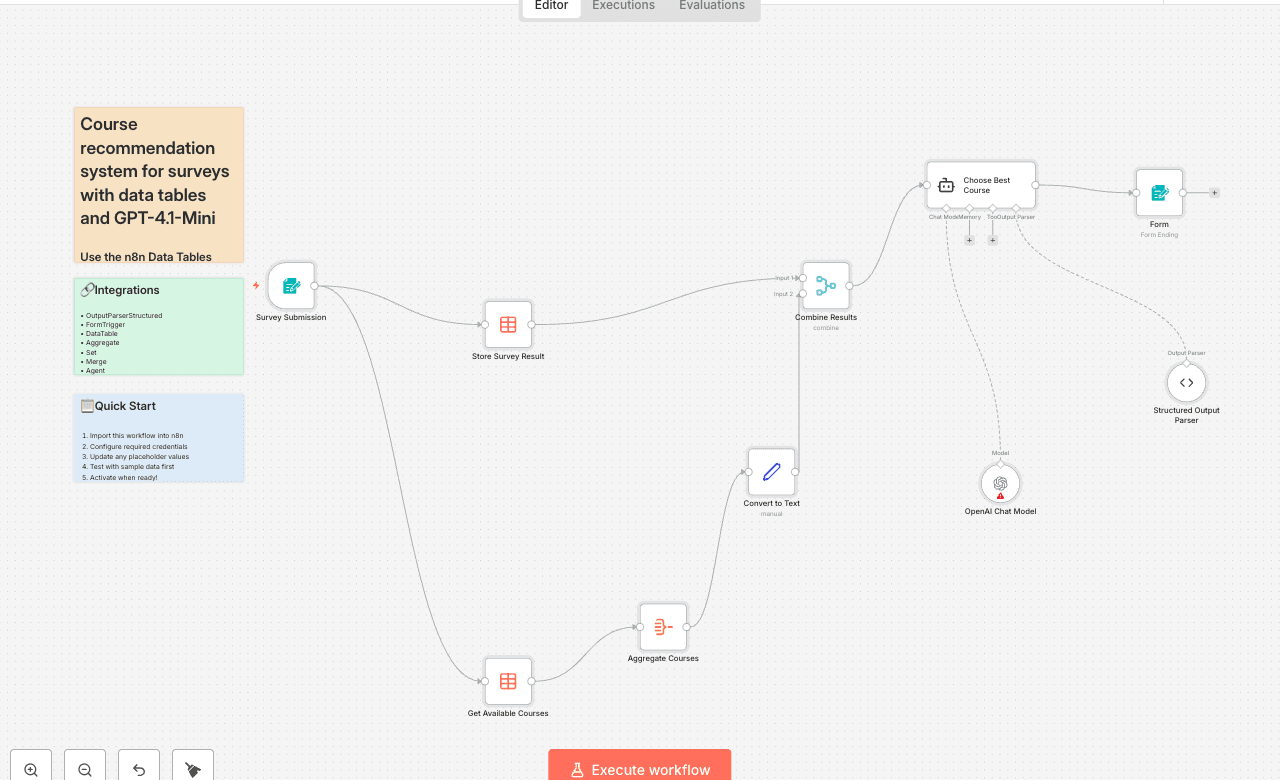
Use the n8n Data Tables feature to store, retrieve, and analyze survey results — then let OpenAI automatically recommend the most relevant course for each respondent. 🧠 What this workflow does This workflow demonstrates how to use n8n’s built-in Data Tables to create an internal recommendation system powered by AI. It: - Collects survey responses through a Form Trigger - Saves responses to a Data Table called Survey Responses - Fetches a list of available courses from another Data Table called Courses - Passes both Data Tables into an OpenAI Chat Agent, which selects the most relevant course - Returns a structured recommendation with: - course: the course title - reasoning: why it was selected > Trigger: Form submission (manual or public link) 👥 Who it’s for Perfect for educators, training managers, or anyone wanting to use n8n Data Tables as a lightweight internal database — ideal for AI-driven recommendations, onboarding workflows, or content personalization. ⚙️ How to set it up 1️⃣ Create your n8n Data Tables This workflow uses two Data Tables — both created directly inside n8n. 🧾 Table 1: Survey Responses Columns: - Name - Q1 — Where did you learn about n8n? - Q2 — What is your experience with n8n? - Q3 — What kind of automations do you need help with? To create: 1. Add a Data Table node to your workflow. 2. From the list, click “Create New Data Table.” 3. Name it Survey Responses and add the columns above. 📚 Table 2: Courses Columns: - Course - Description To create: 1. Add another Data Table node. 2. Click “Create New Data Table.” 3. Name it Courses and create the columns above. 4. Copy course data from this Google Sheet: 👉 https://docs.google.com/spreadsheets/d/1Y0Q0CnqN0w47c5nCpbA1O3sn0mQaKXPhql2Bc1UeiFY/edit?usp=sharing This Courses Data Table is where you’ll store all available learning paths or programs for the AI to compare against survey inputs. 2️⃣ Connect OpenAI 1. Go to [OpenAI Platform] 2. Create an API key 3. In n8n, open Credentials → OpenAI API and paste your key 4. The workflow uses the gpt-4.1-mini model via the LangChain integration 🧩 Key Nodes Used | Node | Purpose | n8n Feature | |------|----------|-------------| | Form Trigger | Collect survey responses | Forms | | Data Table (Upsert) | Stores results in Survey Responses | Data Tables | | Data Table (Get) | Retrieves Courses | Data Tables | | Aggregate + Set | Combines and formats table data | Core nodes | | OpenAI Chat Model (LangChain Agent) | Analyzes responses and courses | AI | | Structured Output Parser | Returns structured JSON output | LangChain | 💡 Tips for customization - Add more Data Table columns (e.g., email, department, experience years) - Use another Data Table to store AI recommendations or performance results - Modify the Agent system message to customize how AI chooses courses - Send recommendations via Email, Slack, or Google Sheets 🧾 Why Data Tables? This workflow shows how n8n’s Data Tables can act as your internal database: - Create and manage tables directly inside n8n - No external integrations needed - Store structured data for AI prompts - Share tables across multiple workflows All user data and course content are stored securely and natively in n8n Cloud or Self-Hosted environments. 📬 Contact Need help customizing this (e.g., expanding Data Tables, connecting multiple surveys, or automating follow-ups)? - 📧 robert@ynteractive.com - 🔗 [Robert Breen] - 🌐 [ynteractive.com]
OutputParserStructuredFormTriggerDataTableAggregateSetMergeAgentLmChatOpenAiForm
Difficulty Rating
Intermediate
5/10
BeginnerIntermediateAdvanced
AI Automation Insiders • Workflow Documentation