Ai-powered degree audit system with Google Sheets and GPT-5
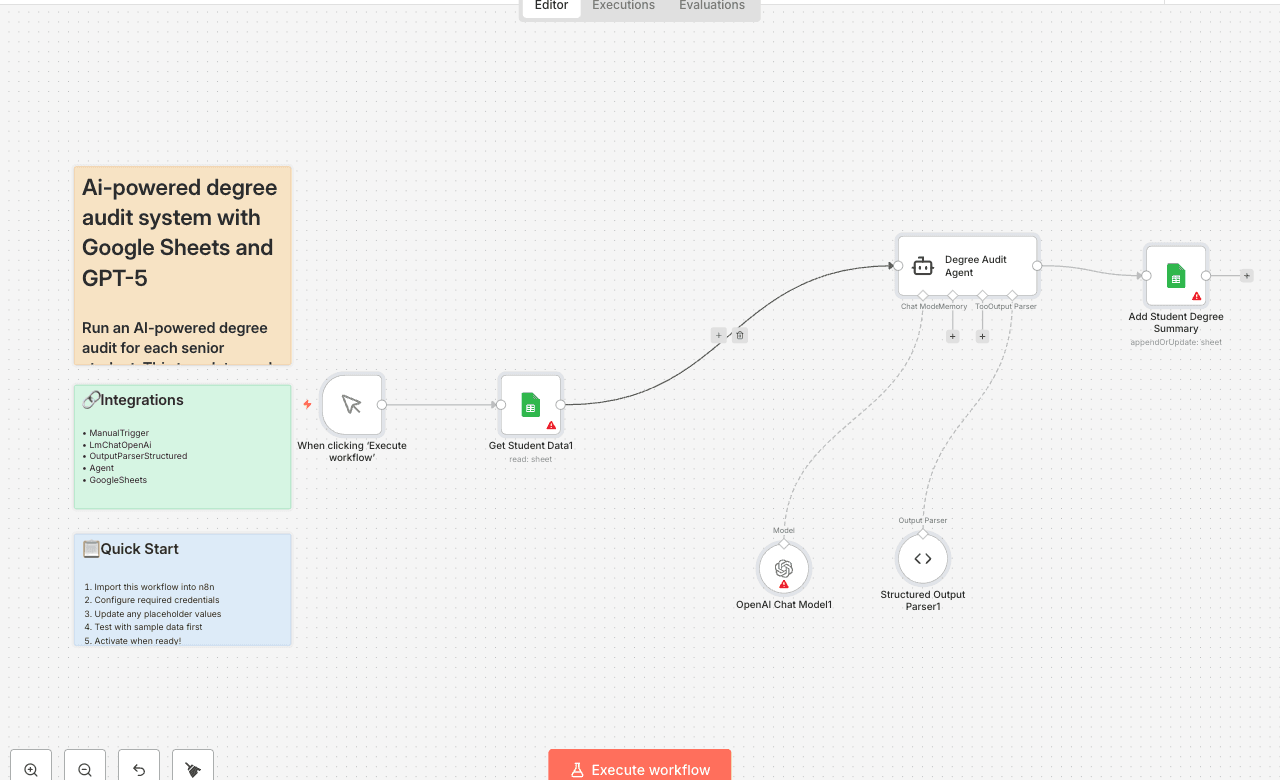
Run an AI-powered degree audit for each senior student. This template reads student rows from Google Sheets, evaluates completed courses against hard-coded program requirements, and writes back an AI Degree Summary of what's still missing (major core, Gen Eds, major electives, and upper-division credits). It's designed for quick advisor/registrar review and SIS prototypes. Trigger: Manual — When clicking "Execute workflow" Core nodes: Google Sheets, OpenAI Chat Model, (optional) Structured Output Parser Programs included: Computer Science BS, Business Administration BBA, Psychology BA, Mechanical Engineering BS, Biology BS (Pre-Med), English Literature BA, Data Science BS, Nursing BSN, Economics BA, Graphic Design BFA Who's it for - Registrars & advisors who need fast, consistent degree checks - Student success teams building prototype dashboards - SIS/EdTech builders exploring AI-assisted auditing How it works 1. Read seniors from Google Sheets (Senior_data) with: StudentID, Name, Program, Year, CompletedCourses. 2. AI Agent compares CompletedCourses to built-in requirements (per program) and computes Missing items + a short Summary. 3. Write back to the same sheet using "Append or update" by StudentID (updates AI Degree Summary; you can also map the raw Missing array to a column if desired). Example JSON (for one student): { "StudentID": "S001", "Program": "Computer Science BS", "Missing": [ "GEN-REMAIN | General Education credits remaining | 6", "CS-EL-REM | CS Major Electives (200+ level) | 6", "UPPER-DIV | Additional Upper-Division (200+ level) credits needed | 18", "FREE-EL | Free Electives to reach 120 total credits | 54" ], "Summary": "All core CS courses are complete. Still need 6 Gen Ed credits, 6 CS electives, and 66 total credits overall, including 18 upper-division credits — prioritize 200/300-level CS electives." } Setup (2 steps) 1) Connect Google Sheets (OAuth2) In n8n → Credentials → New → Google Sheets (OAuth2) and sign in. In the Google Sheets nodes, select your spreadsheet and the Senior_data tab. Ensure your input sheet has at least: StudentID, Name, Program, Year, CompletedCourses. 2) Connect OpenAI (API Key) In n8n → Credentials → New → OpenAI API, paste your key. In the OpenAI Chat Model node, select that credential and a model (e.g., gpt-4o or gpt-5). Requirements - Sheet columns: StudentID, Name, Program, Year, CompletedCourses - CompletedCourses format: pipe-separated IDs (e.g., GEN-101|GEN-103|CS-101). - Program labels: should match the built-in list (e.g., Computer Science BS). - Credits/levels: Template assumes upper-division ≥ 200-level (adjust the prompt if your policy differs). Customization - Change requirements: Edit the Agent's system message to update totals, core lists, elective credit rules, or level thresholds. - Store more output: Map Missing to a new column (e.g., AI Missing List) or write rows to a separate sheet for dashboards. - Distribute results: Email summaries to advisors/students (Gmail/Outlook), or generate PDFs for advising folders. - Add guardrails: Extend the prompt to enforce residency, capstone, minor/cognate constraints, or per-college Gen Ed variations. Best practices (per n8n guidelines) - Sticky notes are mandatory: Include a yellow sticky note that contains this description and quick setup steps; add neutral sticky notes for per-step tips. - Rename nodes clearly: e.g., "Get Seniors," "Degree Audit Agent," "Update Summary." - No hardcoded secrets: Use credentials—not inline keys in HTTP or Code nodes. - Sanitize identifiers: Don't ship personal spreadsheet IDs or private links in the published version. - Use a Set node for config: Centralize user-tunable values (e.g., column names, tab names). Troubleshooting - OpenAI 401/429: Verify API key/billing; slow concurrency if rate-limited. - Empty summaries: Check column names and that CompletedCourses uses |. - Program mismatch: Align Program labels to those in the prompt (exact naming recommended). - Sheets auth errors: Reconnect Google Sheets OAuth2 and re-select spreadsheet/tab. Limitations - Not an official audit: It infers gaps from the listed completions; registrar rules can be more nuanced. - Catalog drift: Requirements are hard-coded in the prompt—update them each term/year. - Upper-division heuristic: Adjust the level threshold if your institution defines it differently. Tags & category Category: Education / Student Information Systems Tags: degree-audit, registrar, google-sheets, openai, electives, upper-division, graduation-readiness Changelog v1.0.0 — Initial release: Senior_data in/out, 10 programs, AI Degree Summary output, append/update by StudentID. Contact Need help tailoring this to your catalog (e.g., per-college Gen Eds, capstones, minors, PDFs/email)? 📧 rbreen@ynteractive.com 📧 robert@ynteractive.com 🔗 Robert Breen — https://www.linkedin.com/in/robert-breen-29429625/ 🌐 ynteractive.com — https://ynteractive.com
ManualTriggerLmChatOpenAiOutputParserStructuredAgentGoogleSheets
Difficulty Rating
Intermediate
5/10
BeginnerIntermediateAdvanced
AI Automation Insiders • Workflow Documentation