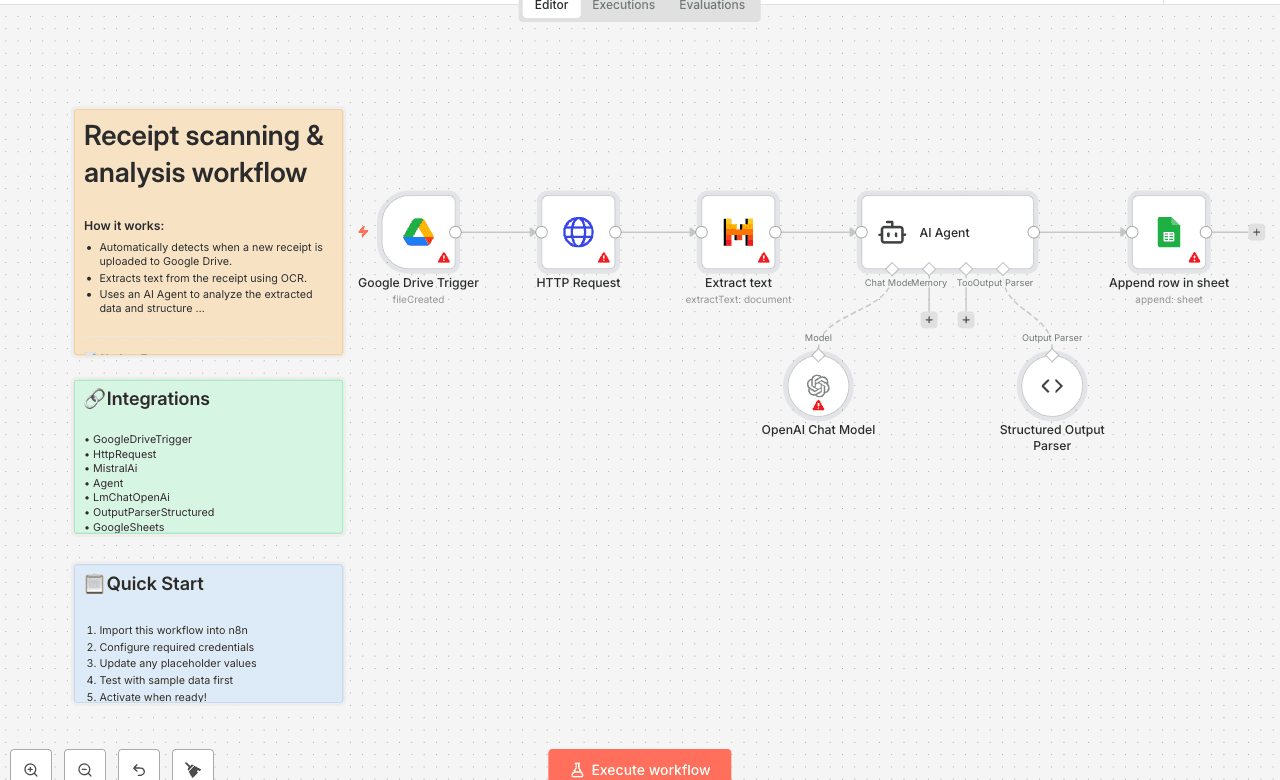
Receipt scanning & analysis workflow
How it works: - Automatically detects when a new receipt is uploaded to Google Drive. - Extracts text from the receipt using OCR. - Uses an AI Agent to analyze the extracted data and structure it (e.g., vendor, date, total, tax). - Saves the organized receipt data into a Google Sheet for easy tracking. Set up steps: - Setup takes around 15–20 minutes. - You'll need a Google Drive folder for receipts and a Google Sheet to store results. - Configure your Google Drive Trigger, OCR extraction, AI Agent, and Google Sheets connection. Detailed instructions and explanations are included in [this n8n Starter Session tutorial series].
GoogleDriveTriggerHttpRequestMistralAiAgentLmChatOpenAiOutputParserStructuredGoogleSheets
Difficulty Rating
Intermediate
5/10
BeginnerIntermediateAdvanced
AI Automation Insiders • Workflow Documentation