Clone viral TikToks with AI avatars & auto-post to 9 platforms using Perplexity & Blotato
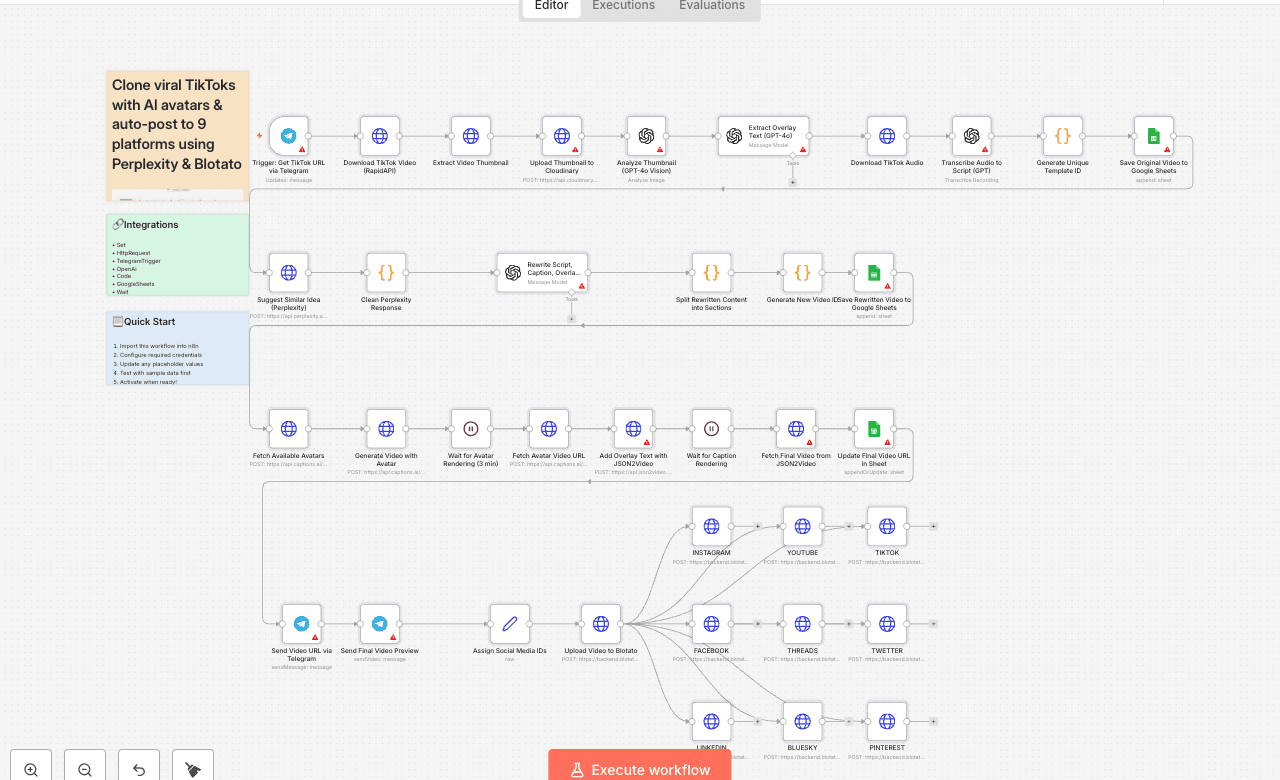
Clone a viral TikTok with AI and auto-post it to 9 platforms using Perplexity & Blotato Who is this for? This workflow is perfect for: - Content creators looking to repurpose viral content - Social media managers who want to scale short-form content across multiple platforms - Entrepreneurs and marketers aiming to save time and boost visibility with AI-powered automation What problem is this workflow solving? Reproducing viral video formats with your own branding and pushing them to multiple platforms is time-consuming and hard to scale. This workflow solves that by: - Cloning a viral TikTok video’s structure - Generating a new version with your avatar - Rewriting the script, caption, and overlay text - Auto-posting it to 9 social media platforms — without manual uploads What this workflow does From a simple Telegram message with a TikTok link, the workflow: 1. Downloads a TikTok video and extracts its thumbnail, audio, and caption 2. Transcribes the audio and saves original text into Google Sheets 3. Uses Perplexity AI to suggest a new content idea in the same niche 4. Rewrites the script, caption, and overlay using GPT-4o 5. Generates a new video with your avatar using Captions.ai 6. Adds subtitles and overlay text with JSON2Video 7. Saves metadata to Google Sheets for tracking 8. Sends the final video to Telegram for preview 9. Auto-publishes the video to Instagram, YouTube, TikTok, Facebook, LinkedIn, Threads, X (Twitter), Pinterest, and Bluesky via Blotato Setup 1. Connect your Telegram bot to the trigger node. 2. Add your OpenAI, Perplexity, Cloudinary, Captions.ai, and Blotato API keys. 3. Make sure your Google Sheet is ready with the appropriate columns. 4. Replace the default avatar name in the Captions.ai node with yours. 5. Fill in your social media account IDs in the "Assign Platform IDs" node. 6. Test by sending a TikTok URL to your Telegram bot. How to customize this workflow to your needs - Change avatar output style: adjust resolution, voice, or avatar ID. - Refine script structure: tweak GPT instructions for different tone/format. - Swap Perplexity with ChatGPT or Claude if needed. - Filter by platform: disable any Blotato nodes you don’t need. - Add approval step: insert a Telegram confirmation node before publishing. - Adjust subtitle style or overlay text font in JSON2Video. 📄 Documentation: [Notion Guide] Need help customizing? Contact me for consulting and support : [Linkedin] / Youtube
SetHttpRequestTelegramTriggerOpenAiCodeGoogleSheetsWaitTelegram
Difficulty Rating
Advanced
8/10
BeginnerIntermediateAdvanced
AI Automation Insiders • Workflow Documentation