Fetch live ETF metrics from JustETF to Excel with one-click updates
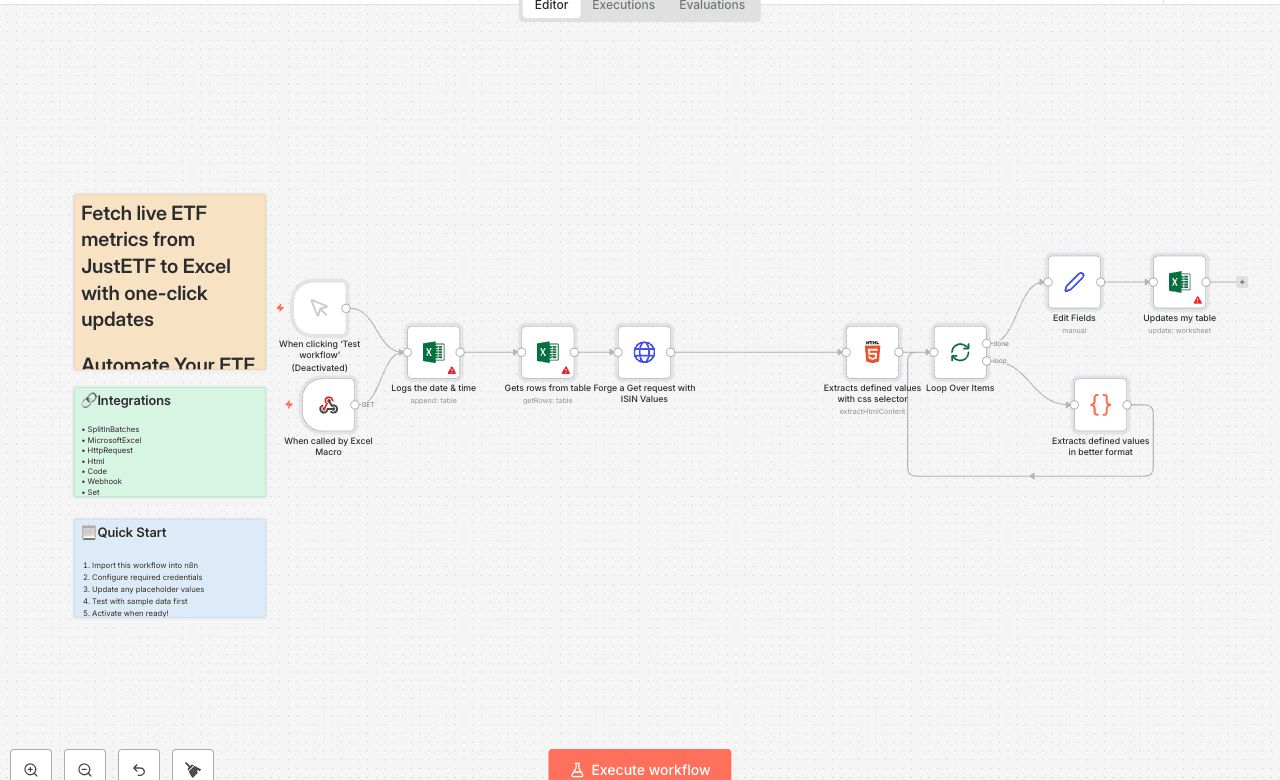
Automate Your ETF Comparison: Real-Time Data & Analysis Automate ETF research in Excel with one click. This n8n workflow pulls live data from justetf.com using ISIN codes from your Excel table, extracts key metrics (dividends, fees, 5-year performance), and updates your “Div study” sheet instantly — all triggered by a button in Excel. Perfect for dividend investors, ETF screeners, or portfolio trackers who want fresh, accurate data without manual copy-paste. How it works 1. Trigger: Click “Update Table” in Excel → calls n8n via webhook 2. Excel: Logs current time (GMT-2) and reads all rows from “DivComp” table 3. HTTP Request: Fetches ETF profile page from justetf.com using ISIN 4. HTML Extraction: Parses page with CSS selectors to grab dividends, fees, 5Y performance 5. Code Node: Cleans & structures data (e.g., last 5 years of dividends, yield, growth) 6. Update Excel: Writes clean values back to your table (fees, yield, performance, name) Setup steps 1. In Excel: - Add a button → assign macro that calls your n8n webhook URL (path: /ETF) - Ensure table “DivComp” has: ISIN, Dernière mise à jour, Frais, Performance depuis 5 ans, etc. 2. In n8n: - Connect Microsoft Excel (OneDrive) credential - Update workbook/worksheet/table references if needed - Test with 1–2 ISINs first 3. Click “Update Table” → watch data refresh in real time! Tags: ETF, Excel, Web Scraping, Investing, Finance, Automation, justetf, Dividend Tracking
SplitInBatchesMicrosoftExcelHttpRequestHtmlCodeWebhookSetManualTrigger
Difficulty Rating
Intermediate
5/10
BeginnerIntermediateAdvanced
AI Automation Insiders • Workflow Documentation