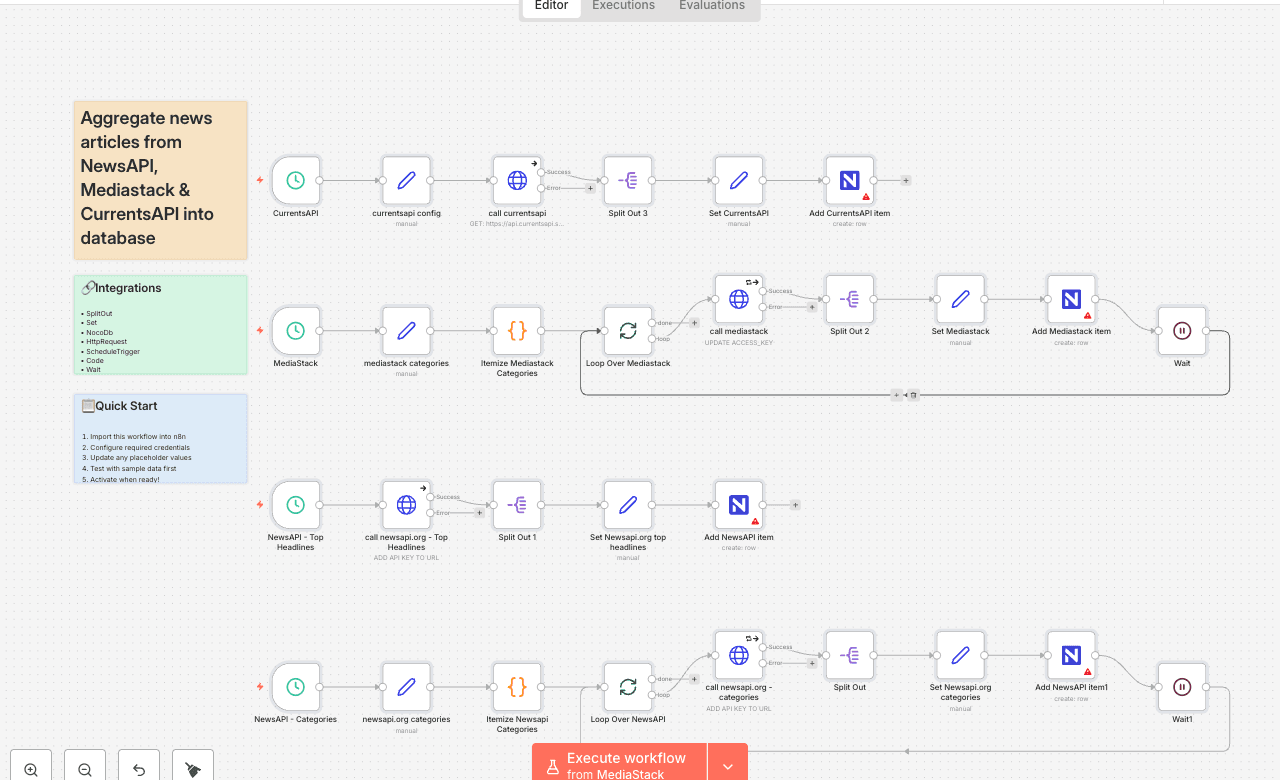
Aggregate news articles from NewsAPI, Mediastack & CurrentsAPI into database
This workflow pulls news articles from NewsAPI, Mediastack, and CurrentsAPI on a scheduled basis. Each provider’s results are normalized into a consistent schema, then written into your database (NocoDB by default). Use case: automated aggregation of categorized news for content pipelines, research agents, or editorial queues. What You Must Update Before Running 1. API Keys Replace all placeholder keys: - call newsapi.org - Top Headlines → update API_KEY in URL - call newsapi.org - categories → update API_KEY - call mediastack → update "ACCESS_KEY" in JSON - call currentsapi → update "API_KEY" param 2. Database Connection Workflow uses NocoDB to store results. You must: - Update the NocoDB API Token credential to your own - Ensure your table includes the fields used in the create operations (source_category, title, summary, author, sources, content, images, publisher_date, etc.) If you prefer Google Sheets, Airtable, or another DB: - Replace each NocoDB node with your equivalent “create row” operation - The Set nodes already provide all normalized fields you need 3. Scheduling All schedulers are disabled by default. Enable the following so the workflow runs automatically: - NewsAPI – Top Headlines - NewsAPI – Categories - Mediastack - CurrentsAPI You may change the run times, but all four must be scheduled for the workflow to function as designed. What You Can Configure 1. Categories Defined in: - newsapi.org categories - mediastack categories Edit these arrays to pull only the categories you care about or to match your API plan limits. 2. Article Limits Adjust article_limit in: - newsapi.org categories - mediastack categories - currentsapi config
SplitOutSetNocoDbHttpRequestScheduleTriggerCodeWaitSplitInBatches
Difficulty Rating
Advanced
8/10
BeginnerIntermediateAdvanced
AI Automation Insiders • Workflow Documentation