Create AI viral videos using NanoBanana 2 PRO & VEO3.1 and publish via Blotato
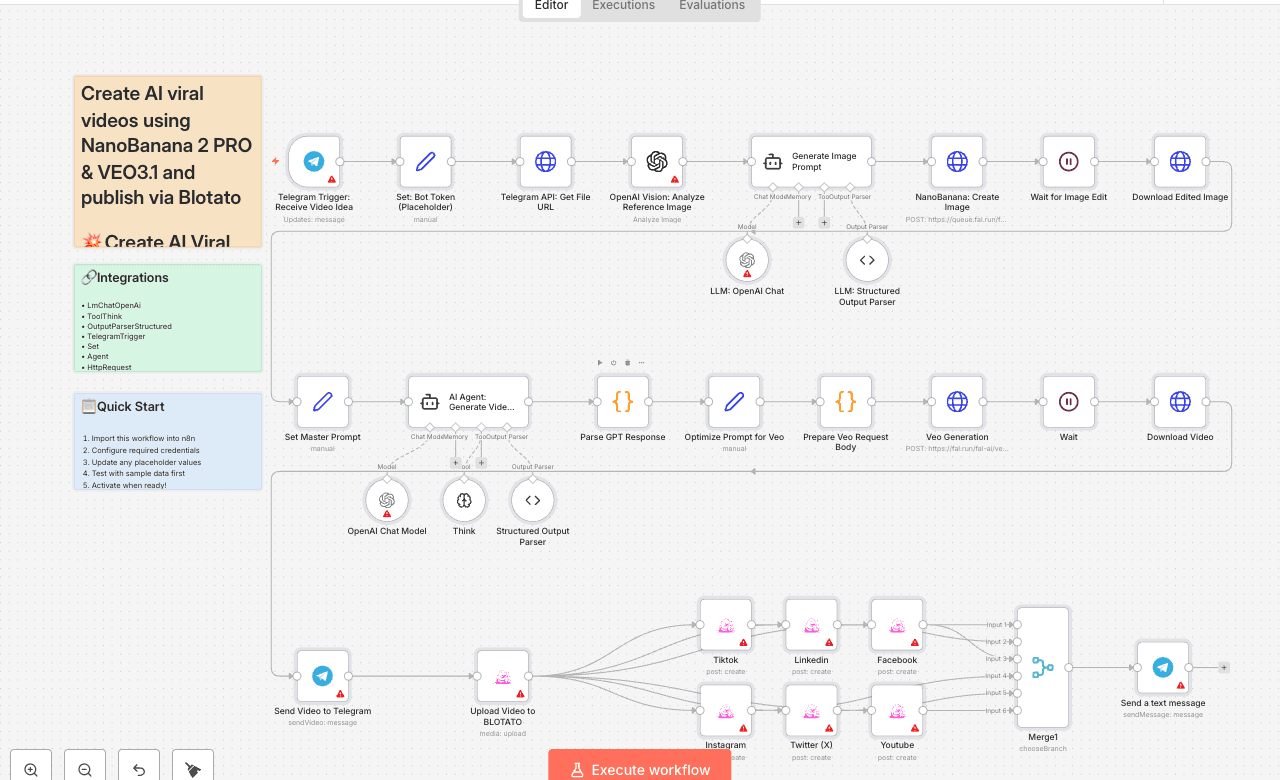
💥 Create AI Viral Videos using NanoBanana 2 PRO & VEO3.1 and Publish via Blotato Who is this for? This template is for content creators, marketers, agencies, and UGC studios who want to turn a simple Telegram message into AI-generated vertical videos, automatically published across multiple social platforms using [Blotato]. What problem is this workflow solving? / Use case Creating short-form video ads usually requires: - Designing visuals - Writing hooks and captions - Generating or editing video - Manually uploading to TikTok, Instagram, YouTube, Facebook, LinkedIn, X, etc. This workflow solves that by automating the full pipeline from image + idea → edited image → AI video → multi-platform post. What this workflow does 1. Create Image with NanoBanana 2 PRO - User sends a photo + caption idea to a Telegram bot. - OpenAI Vision analyzes the reference image. - An LLM builds a UGC-style image prompt. - NanoBanana 2 PRO generates an enhanced, UGC-friendly image. 2. Generate Video with VEO3.1 - An AI Agent structures a detailed Veo prompt (scene, camera, lighting, audio). - Prompt is optimized and sent to VEO3.1 reference-to-video. - The result is a 9:16, ~8s vertical video downloaded back into n8n. 3. Publish with Blotato - Video is uploaded to Blotato. - Posts are created for TikTok, Instagram, YouTube, Facebook, LinkedIn, and X using the AI-generated caption, title, and hashtags. - A final “Published” message is sent on Telegram. Setup 1. Create and configure: - Telegram bot (token in Set: Bot Token (Placeholder) node). - OpenAI credentials. - Fal.ai API key (for NanoBanana 2 PRO + VEO3.1). - [Blotato] account + API credentials and connected social accounts. 2. Import the template into n8n and update all credential references. 3. Test by sending a product image + short idea to your Telegram bot. How to customize this workflow to your needs - Edit the UGC image prompt system message to change visual style (more cinematic, minimal, etc.). - Adjust the VEO prompt optimizer to tweak duration, mood, or camera movement. - Enable/disable specific Blotato platforms depending on where you want to publish. - Modify the caption/hashtag generation logic to match your brand tone, language, or niche. 👋 Need help or want to customize this? 📩 Contact: [LinkedIn] 📺 YouTube: [@DRFIRASS] 🚀 Workshops: [Mes Ateliers n8n] 📄 Documentation: [Notion Guide] Need help customizing? Contact me for consulting and support : [Linkedin] / [Youtube] / [🚀 Mes Ateliers n8n ]
LmChatOpenAiToolThinkOutputParserStructuredTelegramTriggerSetAgentHttpRequestOpenAiWaitCode
Difficulty Rating
Advanced
8/10
BeginnerIntermediateAdvanced
AI Automation Insiders • Workflow Documentation